
Personal + business finances
Every account, every bill, in one place
Your money already has a cycle. MoneyWheel will help you understand it.
MoneyWheel will bring your accounts together so you can see the whole cycle in one place. It will find the bills hiding in your history, show you where your money goes, track your net worth, and keep business and personal apart.
Free to start · No card required · Read-only bank connections

Who is MoneyWheel for?
You may be keeping track of your own checking and cards, managing money with a partner, running a small business, serving as a nonprofit's treasurer, or a bit of everything. MoneyWheel will bring it together with the tools that fit your financial life.
For individuals
See where your money goes and what's coming next.
MoneyWheel will bring your accounts together, find your recurring bills and subscriptions, track your net worth, and show you what your month actually costs.
Read moreFor families
One household doesn't have to mean one giant shared account.
Everyone will understand the household's money without everyone seeing everything. Each account stays as private as you want it, including from the kids.
Read moreFor businesses
Keep business business and personal personal.
Separate a whole account or a single charge, see either side alone or both together, and you'll have what your accountant asks for ready to export.
Read moreFor nonprofits
See where every dollar goes toward the mission.
Program, management and fundraising, in the words your board and your 990 already use, with board and treasurer logins and no shared passwords — for $60 a year.
Read moreSee the full cycle of your money
Money doesn't sit still. It comes in, gets divided between bills and everyday spending, moves into savings and investments, pays down debt, and starts again with the next paycheck. MoneyWheel will show you that whole cycle in one place: where your money came from, where it went, what's coming next and what you're building. It's a Mint alternative you won't have to feed — connect the accounts you already use, and MoneyWheel will read what your money is already telling you.
See where the month went
Every transaction will land in a category, and your spending wheel will show how the month was divided. Click a wedge and you'll see the actual charges behind it.
Every bill, found for you
A subscription tracker that does the finding. MoneyWheel will spot the subscriptions, renewals and bills hiding in your history, show what each costs monthly and yearly, and tell you when the next charge is due — so you'll know how much of your next paycheck is already spoken for.
Net worth in one number
A net worth tracker that will add up your cash, savings, investments and the assets you enter, less what you owe on cards and loans, then follow that number month after month so you'll see which way the bigger cycle is moving.
Separate business and personal expenses
Bought lunch on the business card? Mark a whole account, or just one transaction, as business. Every report will then show personal, business, or both.
A 50/30/20 budget, in three thirds
Your budget will start with the 50/30/20 rule — needs, wants and savings — on one dial you drag to your own split. MoneyWheel will suggest the lines from your last 90 days, then show how each month compares.
Receipts on the transaction
Attach a photo or PDF to any charge, and the proof will be sitting with the expense when it's time to file.
Tick it off against the statement
Mark a charge reconciled once you've checked it against the bank, and you'll always know what has been checked. A hand-entered row can be corrected in place.
Told before it hits
You'll get a daily or weekly email of the bills coming due, and a nudge when a third of your budget is nearly spent or a subscription's price goes up.
On your phone, from the home screen
Install MoneyWheel like an app on iPhone or Android — no store, nothing to update — and it will open with a tap.

The spending wheel
One month, every category, ranked. Hover a wedge and you'll see its share and how many charges it holds; click it and you'll read them.

Recurring subscriptions, detected
Know what's coming next
Bills and subscriptions have a way of adding up, especially the ones you don't think about very often.
MoneyWheel will look through your transaction history and identify recurring charges by how often they appear and how much they typically cost. From rent and utilities to streaming services, insurance, memberships, software and other subscriptions, MoneyWheel will help uncover the expenses that keep coming back.
Once they're identified, MoneyWheel will organize them on your bill calendar, so you can see what's coming, when it's expected, and how much of your money is already spoken for.
It will even help you notice when a recurring charge changes, so that $9.99 subscription that quietly becomes $12.99 doesn't go unnoticed.
Because understanding the cycle of your money isn't just about knowing where it went. It's also about knowing where it's going next.
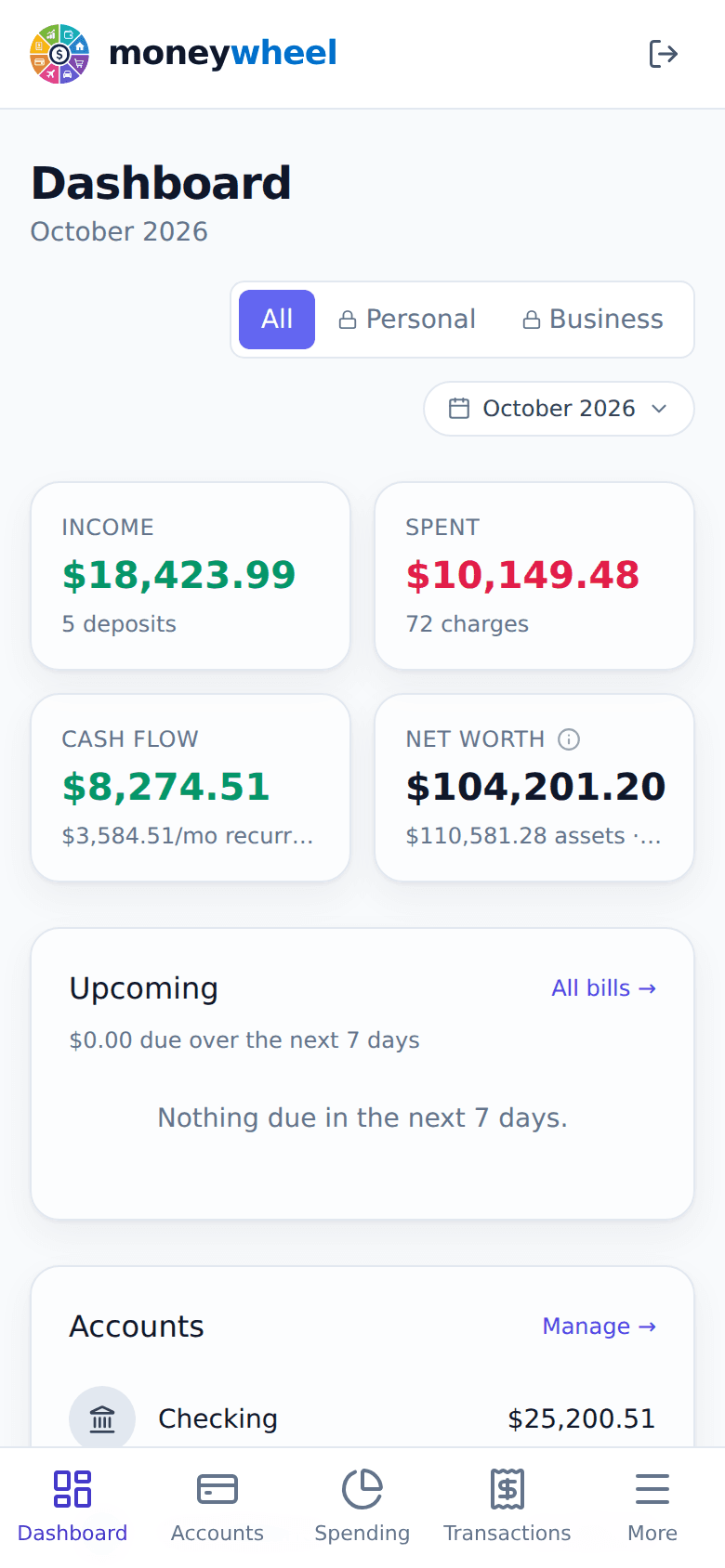
The same books, in your pocket
MoneyWheel is built for the phone as much as the desk. Add it to your home screen and it will open full-screen, like an app, with your dashboard, accounts, spending and transactions a tap away.
- iPhone: open it in Safari, tap Share, then Add to Home Screen.
- Android: open it in Chrome, tap ⋮, then Add to Home screen.
Follow your money from beginning to end
A bank balance only tells you what's there right now. MoneyWheel will help you see the bigger picture, and turn single transactions into a picture you can actually understand.
See what came in
Paychecks, deposits and other income from every account, so you'll know what the month had to work with.
See where it went
Bills, groceries, subscriptions, debt payments and everyday spending, each in a category you can open to the charges behind it.
See what's coming
You'll see which recurring bills are already paid, which are likely next, and how they fit with the money coming in.
See what's changing
Over time you'll spot the patterns: subscriptions creeping up, groceries rising, debt going down, savings growing even when it doesn't feel like it.
Small decisions change the wheel
MoneyWheel isn't here to tell you every cup of coffee is a mistake. It's here to give you information, so you can decide what matters to you: save a little more, pay down a card, cancel something you don't use, or build an emergency fund. You'll see the effect those choices have over time, because changing your financial picture often starts with one small part of the cycle.
Three steps
Create your account
Name, email, a verified code, a password. No card.
Connect your banks
Checking, savings, credit cards and brokerages link through Plaid. Anything it cannot reach you can add by hand.
See your cycle
On the first sync you'll see your balances, categories, recurring bills and net worth — this month, this year, or any period you pick.
Read-only, and yours to delete
MoneyWheel will see your transactions. It will never be able to move your money, and it will never see your bank password.
Bank connections through Plaid
You log in at your bank inside Plaid, not here. The connection is read-only, and your bank password never reaches us.
Never sold, never shared for ads
Your data is never sold, and never shared with advertisers or data brokers. It is used only to show you your own money.
Where your data lives
Accounts and transactions are kept in a Neon database in the United States; the app and your receipt files run on Vercel.
Bank credentials sealed at rest
The tokens that reach your bank, and two-factor secrets, are encrypted at rest with AES-256-GCM. Passwords are never kept, only a slow scrypt hash of them.
Two-factor authentication
Turn on an authenticator app with recovery codes, from Settings. Sessions time out when idle, and changing your password signs every other device out.
Told when your account changes
An email the moment your password, email or two-factor settings change, or a browser we have never seen signs in.
No card to sign up
The free plan needs no payment details at all.
Delete everything, any time
One control in Settings removes your accounts, transactions and login.
Pricing
Start free, with no card. You'll only pay for depth — more banks, more history, sharing with the household, and the business book.
Free
$0
Free forever, not a trial
- Connect up to 3 banks and credit cards
- 3 months of transaction history
- Unlimited accounts you enter yourself
- Recurring income and bills, detected for you
- Automatic categories you can correct
- This month's spending wheel and report
- A budget in thirds, suggested from your own spending
- Envelopes that set cash aside for what you are saving for
- Your complete net worth
Plus
$7.99/mo
$80/yr paid yearly · $6.67/mo
- Everything in Free, plus
- 6 banks, 6 months of history
- Nightly bank sync
- Custom periods and multi-month reports
- Cash flow view
- Bill calendar
- Category rules
- Receipt attachments
Family
$9.99/mo
$100/yr paid yearly · $8.33/mo
- Everything in Plus, plus
- 10 banks, 12 months of history
- Household sharing, up to 5 people
Business
$12.99/mo
$130/yr paid yearly · $10.83/mo
- Everything in Family, plus
- Unlimited banks, 24 months of history
- Personal and business books
- Exports
Nonprofit
$60/yr
$5.00/mo, billed as one year
Everything in Business for a nonprofit, with board and treasurer logins and every dollar split the way your 990 reports it. Two months free, then only the rest of that year is charged. No card until the trial ends.
Plus, Family and Business start with 21 days free, and ask for no card until the trial ends. Free never expires.
Questions people ask
Is it safe to connect my bank?
Yes. You sign in to your bank inside Plaid, never on MoneyWheel, so your bank password never reaches us. The connection is read-only: MoneyWheel can see balances and transactions, but it cannot move money. The token Plaid hands back is encrypted before it is stored, and disconnecting a bank revokes it at Plaid as well.
Which banks are supported?
Banks, credit unions and card issuers in the United States that connect through Plaid, whose network spans over 12,000 financial institutions. Search for yours when you connect. An account Plaid cannot reach can still be added by hand and kept up to date yourself, on every plan.
What happens when the trial ends?
Plus, Family and Business start with 21 days free (60 for nonprofits), and no card is asked for. Pick a plan before the trial ends and it carries on. If you don't, nothing is charged: the account moves to Free on its own and nothing is deleted. Every transaction stays, Free shows the latest 3 months, and upgrading brings the rest back into view. Free itself never expires.
Can I export my data?
Yes. On Business and the nonprofit plan, Settings → Data downloads your transactions as a CSV for Excel, Google Sheets or your accountant, and each spending category can export its own rows. On any plan, you can delete your account and everything in it from Settings, whenever you like.
Who is behind MoneyWheel?
MoneyWheel LLC, a Missouri company started by Mikel Turner, a small business owner in Springfield. The About page has the story.
See the cycle. Understand your money. Take control of what's next.
Your money keeps moving. Keep an eye on the wheel.
See what came in. See where it went. See what's coming. See what's changing. Then make the next turn of your wheel a little more informed than the last.
Get started free