
For businesses
Together when you want it. Separate when you need it.
An expense tracker that keeps business and personal spending apart, down to the transaction.
Running a small business rarely means two perfectly separate financial lives. A personal card picks up supplies; the business card pays for groceries. MoneyWheel is built for that reality, and will separate business and personal spending down to the single transaction.
You'll still have one place to see your complete financial picture. No second app, no second login, and no pretending the two sides never cross.
Free to start · No card required · Read-only bank connections

See where the business money goes
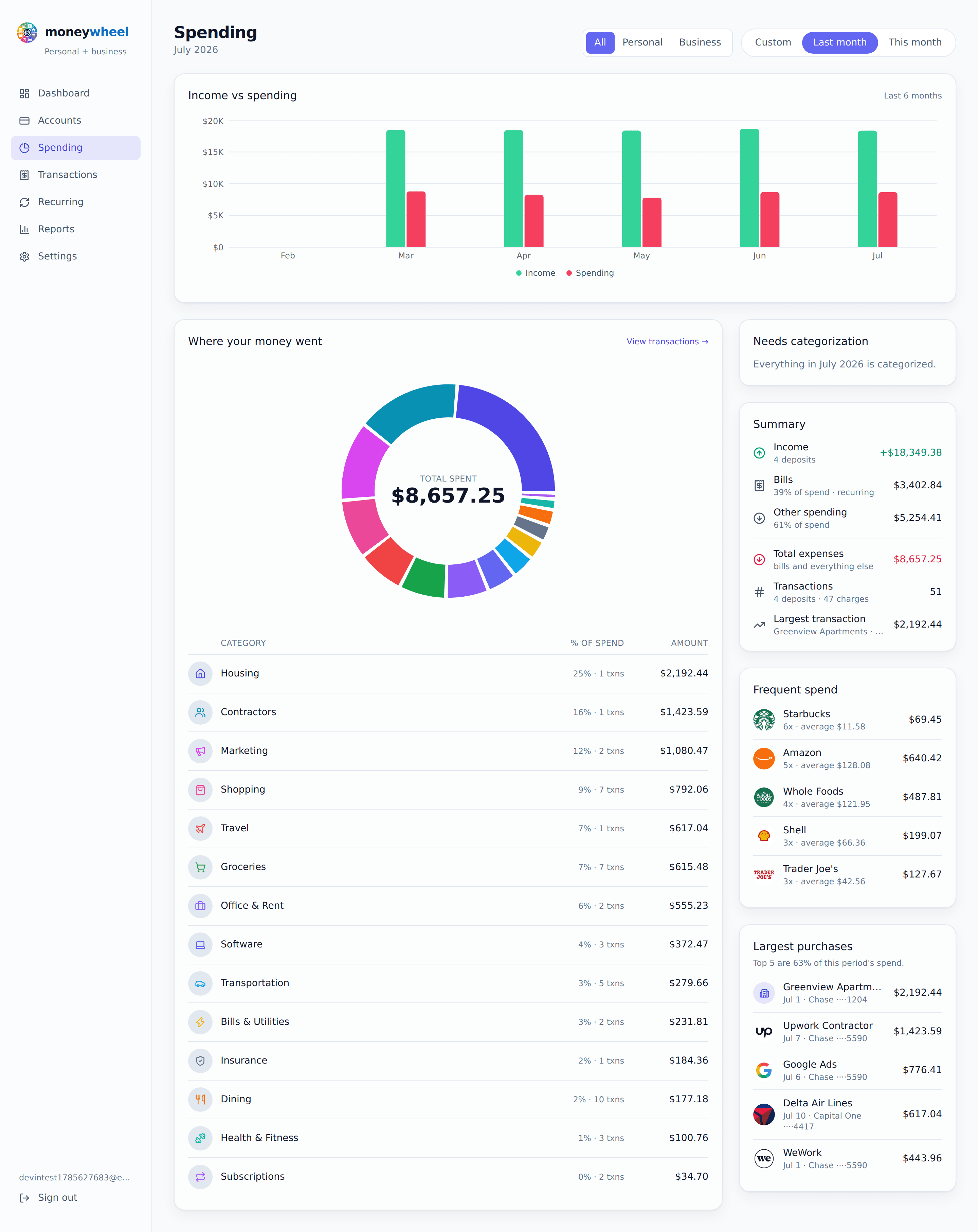
Revenue is only one side of running a business. Knowing where the money goes after it comes in is just as important.
MoneyWheel will sort your business transactions into categories, so you'll see what each part of running the company costs, then select a category to see the transactions behind it. Look at this month, this year, or any period you choose.
You may find software costs have grown, fuel is higher than you thought, or small charges are adding up to something much larger.
The numbers were already there. MoneyWheel will make them easier to see.

Find the expenses that keep coming back
A $10 or $20 monthly charge doesn't get much attention, until you realize you've been paying it for three years.
MoneyWheel will find recurring business expenses by how often they appear and how much they typically cost: software, website services, insurance, memberships, cloud storage, phone service, equipment plans. You'll see what each costs over a year.
On the bill calendar you'll see what's due next and when, so you'll know how much of today's balance is actually available and how much is already spoken for.
Sometimes the easiest expense to cut is the one you forgot you had.
Two sides of your money. One MoneyWheel.
Your business has its own cycle: money in from customers, money out for supplies, software, fuel, insurance, contractors, fees and taxes. Your personal cycle keeps moving too.
MoneyWheel will show every report three ways: personal only, business only, or everything together. One account, one login.
Separate transactions, not just accounts
Office supplies on the personal card. Groceries on the business card. A phone or a vehicle that serves both.
MoneyWheel will let you mark a whole account as personal or business, then override the single transaction that doesn't belong. Change it and the reports follow.
One stray purchase won't force you to reclassify the whole account.
Keep the receipt with the expense
Receipts shouldn't live in a shoebox, a glove compartment or an inbox you'll search later.
MoneyWheel will let you attach a photo or PDF to the transaction itself. The supplies, the equipment invoice, the expense your accountant asks about months from now: the paperwork stays with the charge.
Reconcile it and know it's done
Your bank says a transaction happened. Reconciling lets you say you've checked it.
Work through the statement, mark each transaction reconciled, and you'll know when the month is reviewed and matches your bank's records.
Give your accountant what they actually need
Your accountant doesn't need another password. They need clean information.
Business will export your business transactions as a CSV for the period you choose, with your categories, ready for Excel, Google Sheets or your accountant.
Less sorting later starts with better organization today.
Stop rebuilding the same spreadsheet
Downloading transactions, copying columns, categorizing by hand and rebuilding the report every month is time spent on the spreadsheet, not the business.
MoneyWheel will connect to the accounts you already use: transactions come in, recurring expenses are found, categories organize the spending and receipts stay with the charges.
Built for small business reality
MoneyWheel Business isn't trying to replace your accountant, or turn you into one. It may be right for your business if:
- You're self-employed or a sole proprietor.
- You sometimes use a personal account for business purchases, or the other way round.
- You want business and personal kept apart without running two systems.
- You want to know which recurring expenses and subscriptions the business pays.
- You want receipts attached to the transactions where you can find them.
- You want cleaner information to hand your accountant.
- You're still on a spreadsheet because accounting software feels like more than you need.
- You want to understand your business money without becoming your own bookkeeper.
MoneyWheel will help organize the financial activity. You keep running the business.
Still sorting it out in a spreadsheet? MoneyWheel vs. a budget spreadsheet
Getting started is simple
You don't need to clean up your financial history first. Connect what you have and let MoneyWheel help sort it out.
- 1
Create your account
Your name and email, a verified code, a password. No credit card.
- 2
Connect your accounts
Checking, savings and credit cards link through Plaid, and anything that can't connect you can add by hand. An account doesn't have to be all personal or all business; you'll correct the exceptions one transaction at a time.
- 3
See your business cycle
Once your accounts sync you'll see balances, categories, recurring expenses, spending and net worth for this month, this year or a period you choose, and switch between personal, business and combined.
Connect the accounts. MoneyWheel will help you sort out the rest.
Start free
You don't need to commit to another monthly business expense just to see whether MoneyWheel works for you.
Free
$0
Free forever, not a trial
- Connect up to 3 banks and credit cards
- 3 months of transaction history
- Unlimited accounts you enter yourself
- Recurring income and bills, found for you
Business
$12.99/mo
$130/yr paid yearly · $10.83/mo
- Personal and business books
- Per-transaction personal and business overrides
- 24 months of history from every connected bank
- CSV exports for any period
- Unlimited connected banks
- Household sharing included
- Receipts, recurring expenses, reports and cash flow
Plus, Family and Business start with 21 days free, and ask for no card until the trial ends. Free never expires.
Your business information is still your information
Connecting business accounts takes trust. MoneyWheel is built to help you understand your money, not control it. Through Plaid it can read the balances and transactions you authorize. It can never move your money, and your bank password never reaches MoneyWheel.
Read-only bank connections
You sign in to your bank through Plaid, not MoneyWheel, and the connection can't start a transaction.
Your credentials are protected
Bank-connection tokens and two-factor secrets are encrypted at rest. Your password is stored only as a secure hash.
Add two-factor authentication
Use an authenticator app with recovery codes. Sessions time out after inactivity, and changing your password signs other devices out.
Delete your information when you want
It's your business and your data. Remove your accounts, transactions and MoneyWheel login from Settings whenever you like.
Questions people ask
Do I need a separate MoneyWheel account for my business?
No. Your personal and business activity live in the same MoneyWheel account, each classified separately. View personal, business or everything together, whenever you need to.
What if I use a personal card for a business expense?
That's what Business is built for. Leave the account as personal and mark that one transaction as business. Your reports follow the transaction, not the account.
What if the business card pays for something personal?
The same in reverse: mark the transaction personal and MoneyWheel keeps it out of the business side of your reports.
Does MoneyWheel replace accounting software?
MoneyWheel is built to help small business owners see, organize and understand their money: separating personal and business, organizing spending, finding recurring expenses, keeping receipts, reconciling and exporting. Depending on your business, you may still need accounting software or an accountant for bookkeeping, payroll, taxes or financial statements. MoneyWheel makes what you hand them much easier to organize.
Can I give the information to my accountant?
Yes. Business exports your business transactions as a CSV for the period you choose, with categories, ready for common spreadsheet apps or your accountant's own process.
Is it safe to connect my business bank account?
MoneyWheel connects through Plaid. You sign in to your bank inside Plaid, not on MoneyWheel, so your bank password never reaches us. The connection is read-only: MoneyWheel can see the balances and transactions you authorize, but it can't move money.
What happens when my trial ends?
Business starts with 21 days free, and no card is needed. Choose Business before the trial ends and it carries on. If you don't, nothing is charged and the account moves to Free on its own. Your transactions aren't deleted: Free shows the latest 3 months, and upgrading brings the rest back into view.
Run your business. Understand the money behind it.
You started your business to provide a service, sell a product or build something of your own, probably not to spend your evenings sorting transactions into a spreadsheet.
- Connect the accounts you already use.
- Separate the business purchases from the personal ones.
- Attach the receipts while you still remember them.
- See where the money came from, where it went, and what's coming next.
Your business will keep moving. MoneyWheel will help you see how the money moves with it.
Get started free